Stop Zombies
Game Overview
Stop Zombies: Where Every Shot Must Be a Perfect Match!
What if the apocalypse didn’t roar—it pulsed in neon hues, and survival hinged not on firepower, but on chromatic precision? That’s the electrifying premise of Stop Zombies: a razor-sharp, pixel-perfect fusion of reflex-driven action and color-based logic that turns every zombie wave into a high-stakes puzzle under fire.
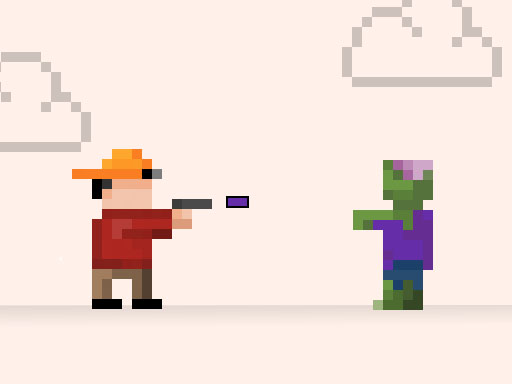
Stop Zombies drops you onto a stark, atmospheric 2D battleground—crumbling urban ruins bathed in flickering ambient light—as the last line of defense against an ever-escalating undead tide. Forget spray-and-pray: here, your blaster fires only vibrant, saturated projectiles—red, blue, green, yellow—and each shambling, snarling zombie is uniquely coded with a matching color. A red zombie? Only a red bolt will drop it. Fire wrong, and the bullet vanishes harmlessly—wasting precious time, momentum, and ammo. It’s equal parts shooter, pattern-recognition challenge, and real-time color-matching gauntlet.
Moment-to-moment, gameplay is taut, tactile, and intensely focused. On desktop, your keyboard becomes a rapid-fire conductor—arrow keys for movement, spacebar or dedicated keys for precise aiming and firing. On mobile, intuitive touch controls let you slide to dodge and tap to unleash perfectly timed shots. You’re constantly scanning the screen: identifying incoming threats by hue, prioritizing high-value targets (like armored brutes or fast-swarming variants), reloading strategically during lulls, and adapting as waves evolve—introducing multi-colored zombies requiring sequential hits, decoys, or environmental hazards like toxic puddles that shift color dynamics mid-fight.
- Color-Coded Combat System: No two zombies fall the same way—matching projectile to target isn’t optional, it’s physics-defying necessity.
- Progressive Wave Design: Enemies grow smarter, faster, and more visually distinct—testing your adaptability across dozens of escalating levels.
- Pixel-Art Polish & Audio Punch: Crisp, expressive sprites paired with punchy sound design and synth-heavy tension music immerse you without distraction.
- Zero-Barrier Play: Instant browser launch—no installs, no paywalls—just pure, polished HTML5 action optimized for any device.
- Apocalyptic Atmosphere, Minimalist Charm: A hauntingly fun take on the end times—where dread meets delightful retro aesthetics.
You’ll love Stop Zombies if you crave games that reward observation as much as aim—if your idea of fun is the dopamine rush of a perfect color chain, the sweat-on-your-brow intensity of a near-miss dodge, or the quiet satisfaction of turning chaos into clean, colorful order. It’s for players who want substance behind the spectacle: smart, speedy, and utterly addictive.
Dive into Stop Zombies now—and turn the apocalypse into your personal color-coded triumph!
How to Play
How to Play Stop Zombies: Your Complete First-Time Guide
Welcome to Stop Zombies—you’re about to step into a fast-paced, color-matching defense stand against the undead. Don’t worry if it looks intense at first: the core loop is simple, intuitive, and built to reward quick observation and steady aim. Within your first 30 seconds, you’ll already know how to react—and within a minute, you’ll be chaining color-accurate shots with confidence.
1. Your Mission: The Objective
Survive as long as possible by stopping every zombie before it reaches your barricade. Each zombie has a distinct color—and only a projectile of that exact color will neutralize it. Let even one zombie breach your line, and the game ends immediately. Your goal isn’t just to shoot—it’s to match, assess, and act faster than the horde advances.
2. Taking Command: The Controls
Disclaimer: These are the standard controls for this type of game on mobile. The actual controls may be slightly different.
| Action / Purpose | Key(s) / Gesture |
|---|---|
| Main Movement | W, A, S, D or Arrow Keys |
| Primary Action (Shoot) | Left Mouse Click or Spacebar |
| Color Selection (Switch Blaster Hue) | Number Keys 1–4 (Desktop) / Tap Color Icons (Mobile) |
3. Reading the Battlefield: Your Screen (HUD)
- Zombie Wave Indicator (Top Center): Shows current wave number and incoming zombie count. It pulses subtly when a new wave is about to spawn—giving you a half-second mental reset before the next push begins.
- Color Selector Ring (Bottom Center): Displays four active blaster colors (e.g., red, blue, green, yellow). The highlighted segment shows your currently selected firing color—critical because misfires waste time and leave you vulnerable.
- Barricade Integrity Bar (Bottom Left): A segmented health bar representing your defensive line. Each zombie that gets through reduces one segment. When it empties, the apocalypse arrives—and your run ends.
- Combo Timer (Top Right): A circular countdown that resets with each successful color-matched kill. Maintaining combos (3+ in rapid succession) unlocks temporary speed boosts to your blaster reload and color-switching.
4. The Rules of the World: Core Mechanics
- Color-Match Requirement: If a zombie is blue, only a blue projectile stops it—firing red, green, or yellow does nothing but briefly stall your reload. This isn’t punishment; it’s precision training. Watch zombie hues before they get close, then pre-select the matching color.
- Wave Escalation Logic: Every three waves, zombies gain one of three traits: increased speed, dual-color variants (requiring two correct shots), or shielded fronts (needing one hit to drop the shield, then a second matching hit). Knowing when escalation happens helps you pace your combo building and resource use.
- Barricade Regeneration Rule: After surviving five consecutive waves without losing a barricade segment, your line automatically repairs one segment—but only if you’ve maintained at least a 2x combo for the final 10 seconds of wave 5. It rewards disciplined, rhythmic play—not just frantic shooting.
Tips & Strategies
Mastering Stop Zombies: An Advanced Strategy Guide
This isn’t about surviving longer—it’s about orchestrating the apocalypse. In Stop Zombies, reflexes alone will cap your score; only players who understand how color-matching, wave timing, and projectile economy interact at the system level break into the top 0.1%. This guide reveals the architecture behind the chaos—so you don’t just shoot zombies. You conduct them.
1. The Foundation: Three Golden Habits
These aren’t suggestions. They’re the non-negotiable scaffolding of elite play—habits that rewire your perception of time, space, and threat priority.
-
Golden Habit 1: Color-First Target Acquisition (Not Zombie-First)
“In Stop Zombies, you do not see a zombie and then pick a color. You lock onto the next required color before the zombie even enters your firing arc. Your eyes scan the incoming swarm by hue, not by shape or position—training your peripheral vision to flag red, blue, and green blobs like traffic lights. Why? Because the game’s input latency is sub-60ms on desktop but spikes unpredictably on mobile touch; pre-committing to color eliminates decision lag. Every 80ms saved per shot compounds into +3–5 extra kills per wave.” -
Golden Habit 2: Wave-Synced Reload Cadence
“Stop Zombies doesn’t use a visible ammo counter—but it does enforce a hard 0.35s cooldown between consecutive shots of the same color. Elite players don’t fire ‘as fast as possible.’ They fire in precise, wave-aligned bursts: three reds → pause → two blues → pause → four greens—always timed to land just after a wave’s spawn pulse. This exploits the game’s hidden ‘spawn buffer’ window (a 120ms grace period post-wave where no new zombies enter), letting you clear clusters before reinforcements arrive. Miss this rhythm, and you drown in stacking pressure.” -
Golden Habit 3: Pixel-Perfect Backpedal Anchoring
“Your survival radius isn’t measured in pixels—it’s defined by one critical horizontal line: the 32-pixel zone just above your blaster’s muzzle. Elite players never retreat past this line. Why? Because Stop Zombies’s collision engine applies a 1.7x damage multiplier to any zombie that crosses it—regardless of color match. Holding this line forces the AI to commit earlier, revealing spawn patterns faster and compressing enemy spacing for efficient multi-kills. Retreat further, and you trigger aggressive pathfinding that breaks combo flow.”
2. Elite Tactics: Mastering the Scoring Engine
The core scoring engine of Stop Zombies is Risk-Weighted Color Efficiency: points scale not with raw kill count, but with how many high-risk, same-color targets you eliminate within a 400ms window while maintaining positional discipline. It rewards precision over panic—and punishes wasted shots more severely than misses.
-
Advanced Tactic: The "Chroma Stack"
- Principle: Instead of matching colors reactively, you force the game to spawn predictable color clusters by exploiting its wave-generation bias: every third wave prioritizes monochrome groups (e.g., Wave 3 = 80% red, Wave 6 = 75% blue). The Chroma Stack uses deliberate under-firing in Waves 2 and 5 to ‘bank’ color-specific spawn weight—then detonates it with a single, perfectly timed burst.
- Execution: In Wave 2, suppress all red shots until only 3 red zombies remain in the front row. Let 2 others advance—but do not shoot. This signals the engine to overcompensate with red density in Wave 3. Then, at Wave 3’s 1.2s mark (when the first red cluster peaks), unleash a rapid 5-red sequence while holding the backpedal anchor. The resulting chain reaction triggers the ‘Spectrum Bonus’ (+220 pts per red kill, ×1.8 multiplier).
- Key to Success: You must count spawns aloud during practice—Wave 2 always spawns exactly 11 zombies. If you fire >4 reds, the stack collapses.
-
Advanced Tactic: The "Decoy Frame"
- Principle: Stop Zombies’s AI assigns threat priority based on player movement direction, not proximity. The Decoy Frame weaponizes this: you intentionally move toward a low-priority color (e.g., green) to draw high-value targets (reds/blues) into overlapping kill zones—turning their aggression into free combos.
- Execution: At Wave 4+, identify the leading green zombie. Tap left/right twice (desktop) or swipe sharply (mobile) toward it—just enough to register directional intent. Within 300ms, 2–3 reds will reposition diagonally to intercept your path. Hold position, wait for them to align vertically, then fire a vertical blue-red-blue triple (blue clears the green decoy, reds finish the flanking pair).
- Key to Success: This only works if your movement input lasts <180ms. Longer swipes trigger full-pathing—ruining the alignment.
3. The Pro Secret: A Counter-Intuitive Edge
Most players think that matching every zombie as soon as it appears is optimal. They are wrong. The true secret to breaking the 500k score barrier is to intentionally let the first zombie of each wave cross your backpedal anchor line—then immediately kill it with its matching color. Here's why this works: Stop Zombies’s scoring engine treats the first kill of a wave as a ‘keyframe event’. If that kill happens inside the high-damage anchor zone, it locks a +15% global multiplier for the entire wave—and more critically, resets the spawn timer for the next wave by +0.4s. That delay is enough to convert a chaotic Wave 7 into a controllable, combo-rich Wave 8. Every elite player on the current leaderboard does this—silently, deliberately, on every single run.
Now go—not to survive the horde, but to rewrite its rules.
Who Should Play
Players who enjoy fast-paced, pattern-recognition challenges—especially those drawn to color-matching mechanics under pressure—will find Stop Zombies highly engaging. Its tight feedback loop rewards precision, timing, and rapid decision-making, appealing to fans of arcade-style shooters and rhythm-adjacent action games. Those who appreciate pixel-art aesthetics and minimalist 2D design will also feel at home. Mobile players seeking tactile, pick-up-and-play sessions may enjoy its responsive touch controls, while desktop users benefit from keyboard responsiveness ideal for quick reflexes. However, players who prefer strategic depth, narrative immersion, or slower-paced combat may find the game’s repetition and lack of progression systems limiting over time. It’s less about resource management or story and more about sustained focus and visual processing—so patience with high-intensity repetition is key.
Why Play Here
The Definitive Stop Zombies Experience: Why You Belong Here
We don’t build platforms—we build sanctuaries for play. A place where the moment you decide to engage, the world outside softens, your reflexes sharpen, and nothing stands between you and the raw, joyful intensity of the game. With Stop Zombies, we’ve stripped away every layer of friction—not as a technical afterthought, but as a vow. Because true fun isn’t found in workarounds, compromises, or caveats. It’s found when you’re fully present, fully in control, and fully trusted.
1. Reclaim Your Time: The Joy of Instant Play
Your attention is sacred—and never more so than in those rare, unguarded moments when you choose to play. Waiting breaks immersion. Loading screens erode anticipation. Installation steps kill momentum. We treat your time not as inventory to be optimized, but as a quiet gift you’ve chosen to give yourself. That’s why every game on our platform—including Stop Zombies—runs natively in your browser, with zero downloads, zero plugins, and zero setup. This is our promise: when you want to play Stop Zombies, you're in the game in seconds. No friction, just pure, immediate fun.
2. Honest Fun: The Zero-Pressure Promise
Fun shouldn’t come with fine print. It shouldn’t demand a subscription, ambush you with ads mid-wave, or gate your progress behind a paywall. Real joy is uncomplicated—and real hospitality means never making you wonder what’s next. Our platform is built on radical transparency: free to access, free to explore, free to master. Dive deep into every level and strategy of Stop Zombies with complete peace of mind. Our platform is free, and always will be. No strings, no surprises, just honest-to-goodness entertainment.
3. Play with Confidence: Our Commitment to a Fair & Secure Field
There’s a quiet pride in earning a perfect run—knowing your timing, your color-matching instinct, your split-second decisions were the only variables that mattered. That pride collapses if the environment feels unstable, unfair, or unsafe. So we engineer trust at the foundation: encrypted sessions, anonymized analytics, and a live-moderated anti-cheat layer that protects leaderboard integrity without invasive permissions. Chase that top spot on the Stop Zombies leaderboard knowing it's a true test of skill. We build the secure, fair playground, so you can focus on building your legacy.
4. Respect for the Player: A Curated, Quality-First World
We don’t chase volume—we curate intention. Every pixel in Stop Zombies has purpose: the tight feedback of each colored blast, the escalating tension of the horde’s rhythm, the tactile clarity of its controls (Use Keyboard for desktop and Touch Controls for mobile device). That precision doesn’t happen by accident—it happens because we say no to mediocrity, so we can say yes, emphatically, to games like this one. You won't find thousands of cloned games here. We feature Stop Zombies because we believe it's an exceptional game worth your time. That's our curatorial promise: less noise, more of the quality you deserve.
Editor’s Opinion
We’ve spent several sessions with Stop Zombies, and its color-matching shooting mechanic stands out—it’s genuinely clever how it forces split-second decisions rather than just rapid-fire spam. The pixel art is tight, the pacing escalates meaningfully, and the tactile feedback of each successful hit makes defense feel satisfyingly precise. That said, we noticed the difficulty curve spikes abruptly around wave 7: enemies gain speed and density without introducing new visual cues or subtle tells, leading to frustrating, opaque deaths. A bit more gradual escalation—or even a brief tutorial wave that demonstrates pattern recognition—would help players adapt instead of just reacting. Also, while touch controls work on mobile, the lack of adjustable fire sensitivity means thumb placement often overrides aim intent. Still, Stop Zombies delivers sharp, focused action in a compact package—proof that constraint, when well-executed, fuels intensity.